What Is AI Data Extraction? How AI Changed Web Scraping for Everyone
April 21, 2026
You see data on a webpage — a product listing, a table of prices, a directory of contacts — and you need it in a spreadsheet. The traditional answer was web scraping: write a script, figure out CSS selectors, handle pagination, and hope the site doesn’t change its HTML next week. AI data extraction is a different approach. It reads the page the way a human would, identifies the structure automatically, and hands you clean, organized data — no coding required.
Traditional Web Scraping: Powerful but Fragile
Web scraping has been around for decades. The basic idea is simple: a program loads a webpage, parses the HTML, and extracts specific elements using selectors like div.price or table > tr > td:nth-child(2).
This works well when you have:
- A consistent page structure that rarely changes
- Technical skills to write and maintain scripts
- Time to debug when the site updates its layout
But for most people who just need data from a webpage, traditional scraping has real barriers:
- Coding required. You need to understand HTML structure, CSS selectors, or XPath to target the right elements.
- Fragile selectors. When a website updates its design, your selectors break. Maintaining scripts is an ongoing cost.
- One-site-at-a-time. Each website has a different structure, so each needs its own configuration.
- Setup overhead. Even no-code scraping tools often require you to click through a multi-step configuration, define navigation rules, and map fields manually.
For a developer building a data pipeline, this effort makes sense. For a marketer who wants to grab competitor pricing or a researcher collecting public directory data, it’s often too much.
How AI Data Extraction Works
AI data extraction takes a fundamentally different approach. Instead of relying on fixed CSS selectors, it uses machine learning to understand what’s on the page.
Here’s what happens behind the scenes:
1. Noise Removal
The AI first strips out elements that aren’t content: navigation menus, cookie banners, ad blocks, sidebars, and footer links. What remains is the actual content of the page.
2. Pattern Detection
Next, the AI scans for repeating structures — rows in a table, items in a product grid, entries in a directory. It doesn’t need to be told “this is a table” or “each product card has class .product-item”. It recognizes the pattern from the content structure itself.
3. Field Identification
For each repeating item, the AI identifies the fields: name, price, URL, date, rating, description. It does this by understanding the semantic meaning of the content, not just its position in the HTML.
4. Structured Output
The result is a clean table with labeled columns, ready to export as CSV or JSON. No post-processing or manual cleanup needed.
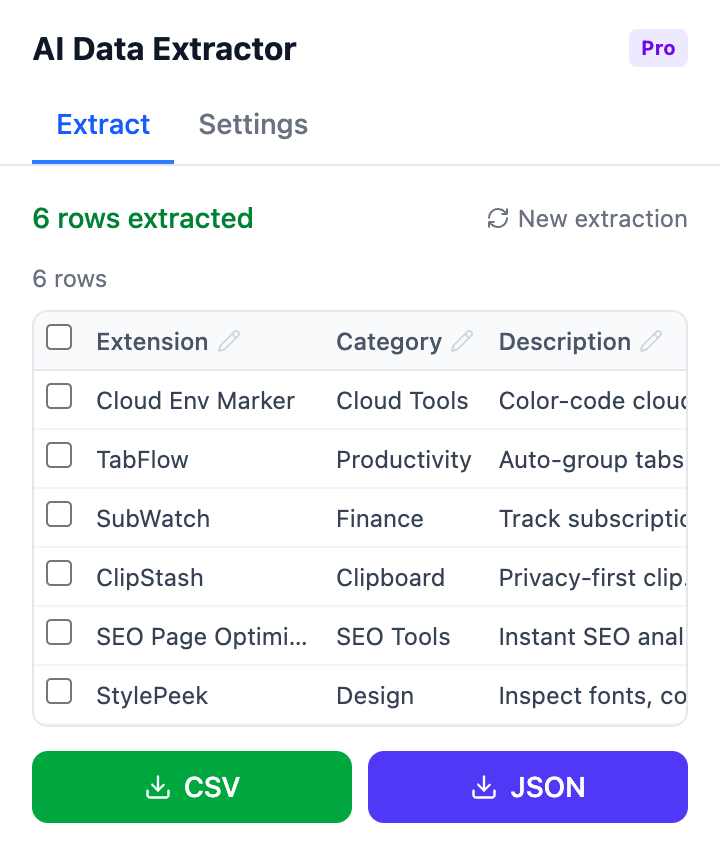
AI-extracted data organized into a structured table, ready for export
Why This Matters for Non-Technical Users
The shift from selector-based scraping to AI-based extraction removes the biggest barrier: you don’t need to understand the page’s HTML. You just open the page with the data you want, and the AI figures out the structure.
This makes web data extraction practical for:
- Market researchers pulling competitor pricing or product catalogs
- Recruiters collecting candidate profiles from job boards
- Sales teams building prospect lists from directories
- Journalists gathering public records or government data
- Students compiling datasets for academic projects
In all these cases, the user knows what data they want but shouldn’t need to learn web development to get it.
Browser-Based AI Extraction: The Simplest Approach
Most AI data extraction tools are cloud-based services with dashboards, API keys, and monthly subscriptions. They’re built for teams running large-scale data pipelines.
But for individual users who need data from the page they’re already looking at, a browser extension is the most direct path. There is no URL to paste into a separate tool, no API to configure, no data to route through external servers.
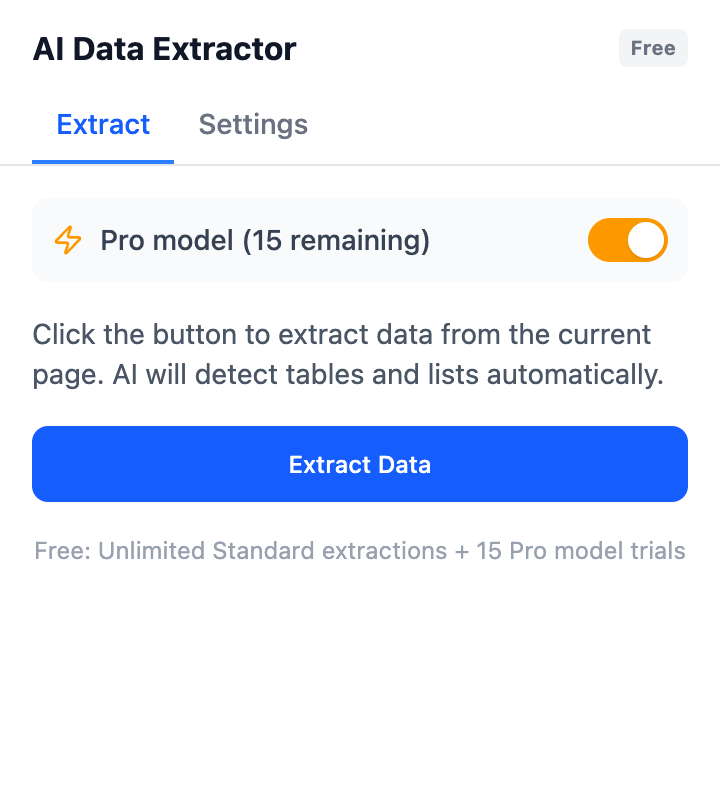
One-click extraction right from the page you’re browsing
AI Data Extractor is a Chrome extension that runs this AI pipeline directly in your browser. Open any webpage, click Extract, and it detects tables, lists, and repeating patterns on the page. You can edit the results in-line before exporting to CSV or JSON.
When AI Extraction Works Best (and When It Doesn’t)
AI data extraction is ideal for:
Good fit for AI extraction:
- Pages with visible structured data (tables, grids, lists, directories)
- One-off or occasional data collection
- Varied websites where building custom scrapers isn’t worth the effort
- Users without programming experience
It’s less suited for:
- High-volume automated pipelines that run hourly across thousands of pages — cloud scraping services are better for this
- Data behind authentication that requires login sessions
- Heavily JavaScript-rendered content that doesn’t appear in the initial page load (though many modern tools handle this)
- Pixel-perfect accuracy requirements where a hand-tuned selector would be more reliable
For most everyday data collection needs — grabbing a table of results, compiling a product list, extracting directory entries — AI extraction is faster and easier than any alternative.
The Bottom Line
AI data extraction didn’t just improve web scraping. It made web data accessible to people who were never going to write a scraper in the first place. If you can see data on a webpage, you should be able to use it — and that’s what AI extraction delivers.
Try it yourself: AI Data Extractor turns any webpage into structured CSV or JSON with one click. Free to use — no account required.
Found this helpful? Leave a review on the Chrome Web Store — it helps others discover the tool.
Questions or feedback? Reach out at support@joifup.com.